New ID from the WhatsApp desk in about 5 minutesDeposit from ₹200 by UPI or IMPSWithdraw to your own UPI in 20-40 minutesLive casino rounds from ₹100Aviator and Crazy Time bets from ₹10New ID from the WhatsApp desk in about 5 minutesDeposit from ₹200 by UPI or IMPSWithdraw to your own UPI in 20-40 minutesLive casino rounds from ₹100Aviator and Crazy Time bets from ₹10
PlayinMatch App Download APK Old Version — Update to the Latest Build Safely
Skip the PlayinMatch app download APK old version: every v1.x build now fails at sign-in because the login API behind it changed, so the working fix is the current 22 MB Android file from the desk link. Your user ID, password and wallet carry over untouched. iPhone owners never had an app at all; Safari's Add to Home Screen does that job.
Fast PlayinMatch Sign-In Once the v1.x Copy Is Gone
Nothing about your PlayinMatch account changes when you swap builds. The user ID you had on the old app is the one you type here, the password stays the same, and the wallet figure is whatever it was last night. Only the the app file is new.
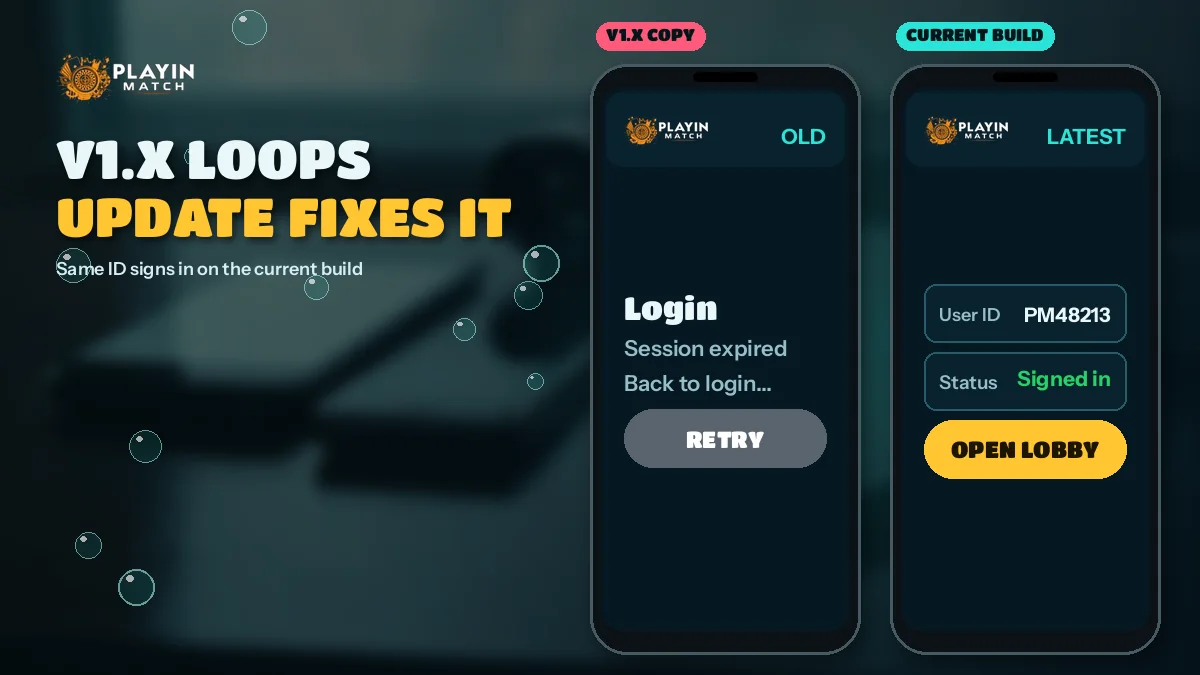
Test it after the 22 MB install: if the fresh PlayinMatch app opens to this layout and accepts the old ID, the swap worked. The three boxes on the right cannot be typed into. Tap the sign-in button and it carries you off this desk to the live PlayinMatch address, so your password never touches playsinmatch.
PlayinMatch Old Version Searches, Matched to the Safe Route
What a playinmatch app download apk old version search turns up
Mostly v1.x files reposted by third-party sites. They install fine and then stall on the PlayinMatch login screen, because the sign-in service they were written for has been replaced. A build that cannot sign in has no use left, however old the phone is.
Why playinmatch app download apk old version ios links are dead ends
PlayinMatch never shipped an iPhone build, old or new: no App Store listing and no IPA. Anything sold or shared under that label is fake. Safari plus Add to Home Screen gives iPhone users the same account with one tap.
Clearing the stuck v1.x copy off the handset
A mirror-signed v1.x file and the desk build rarely share a signature, so uninstalling first saves a failed attempt. Balance and bets sit with the PlayinMatch ID on the server, untouched.
Fetching the current file from the desk chat
Send your user ID to the WhatsApp desk, open the link it returns in Chrome, and install the roughly 22 MB file.
Old or latest version on Uptodown compared with the PlayinMatch desk link
Source
Signs in today?
Who checks the file
playinmatch app download apk old version uptodown
No, v1.x loops at login
Nobody at PlayinMatch
playinmatch app download apk latest version uptodown
Unclear, may be repackaged
Nobody at PlayinMatch
Desk link on WhatsApp
Yes, current build
Sent by the desk, about 22 MB
Depth gauge
Why the PlayinMatch App Download APK Old Version Fails: A Clear Timeline
People rarely go looking for an old build out of nostalgia. Usually the PlayinMatch app on their phone stopped working one evening, a search suggested a "previous version" might behave better, and a mirror site was happy to offer one. That logic works for some apps. It does not work here.
The reason is on the server side, not on your phone. Read the gauge from the surface down; each level is one step deeper into why a v1.x file cannot be rescued.
A v1.x copy sits on the handset. Maybe it came from a mirror months ago, maybe it was the first PlayinMatch file you ever installed and it simply never got replaced.
PlayinMatch changed its sign-in API. The current build talks to the new service. The old build still knocks on a door that no longer answers.
The symptoms show up at login. Either a "network error" banner, or you type the password and land back on the same empty login screen, again and again.
Reinstalling the same old file changes nothing. Neither does clearing cache, switching from Wi-Fi to 4G, or trying a different v1.x upload from another mirror. Same code, same dead call.
The current build fixes it in one install. It comes from the desk link, weighs about 22 MB, and from then on an in-app prompt tells you when the next update is ready.
So the search for a PlayinMatch app download APK old version is answering the wrong question. What matters is getting the build that the sign-in service accepts today. That part is short, and the reinstall section further down covers it step by step.
One thing that confuses people: the error says network, so they blame the SIM, the router, or a blocked address. Addresses do get blocked in India, that much is true, but a blocked address and a v1.x login loop look different. A blocked address fails in the browser too. A dead old build fails only inside the app, while the same PlayinMatch ID signs in fine on the mobile site.
Put differently: when the PlayinMatch website works and the PlayinMatch app does not, stop changing networks. When neither works, ask the desk for the current address before touching the app.
That browser test takes roughly a minute and settles the question. If PlayinMatch opens in Chrome with your ID and the app does not, the app is the problem, and an update is the fix.
Uptodown or the Desk Link: Which PlayinMatch APK File Is Safe to Trust
Mirror sites such as Uptodown collect APK files from wherever they can find them and republish them with their own download pages. PlayinMatch does not run any of them. Nobody on the PlayinMatch side uploads there, reviews what is there, or removes a file once it goes stale.
Desk link (use this)
Sent to you on WhatsApp after you share your user ID
The current PlayinMatch build, the one the sign-in service accepts
File size close to 22 MB, installer name matches what the desk told you
Future updates announced by the app itself
Mirror file (skip it)
Old version uploads are v1.x and loop at login
Latest version uploads may be repackaged with extra code inside
No way to tell who built the file or what it asks permission for
A login typed into a modified app can end up somewhere else
Version labels on those download pages deserve little trust either. A mirror can title a file latest simply because it is the newest thing it scraped, which may still be a v1.x upload from long ago, and the PlayinMatch app itself only reports its real version after installation. By then the file has already run on your phone.
The two keyword routes people use, playinmatch app download apk old version uptodown and playinmatch app download apk latest version uptodown, sound different but end in the same place. The old one is useless for sign-in. The new-looking one might work, or might be a repack, and from the download page you cannot tell which.
Two checks catch most fakes before you tap Install. First, size: the genuine PlayinMatch file is about 22 MB, so a 9 MB or 60 MB download is a warning sign on its own. Second, the installer name: the desk tells you what the file is called, and the one in your Downloads folder should match it letter for letter. Neither check is perfect (a careful repack could copy both), which is exactly why the source matters more than the checks.
Already installed a mirror copy? Clean-up order for PlayinMatch users
It happens a lot, and it is fixable in about five minutes. Order matters here, because doing the password change first on a compromised copy just hands over the new password too.
Uninstall the mirror PlayinMatch app entirely, from App info rather than by dragging the icon away (dragging on some launchers only hides it).
In Android settings, find the apps allowed to install unknown apps and switch the permission off for whichever browser or file manager pulled the mirror file. Chrome keeps it only if Chrome will fetch the desk link.
Install the current build from the desk link and sign in once.
Change the password from inside the new PlayinMatch app. Every other session, including anything the mirror copy may have opened, gets logged out at that moment.
Mirror APKs also show up on the list of complaint patterns covered on the is PlayinMatch safe page, next to fake Telegram support and KYC name mismatches. If you already installed a mirror copy and typed your password into it, change the password after you move to the current build; a password change logs every device out, which is the point.
iPhone and iPad
PlayinMatch on iPhone: The Real Answer to Old Version iOS Searches
This one is short. PlayinMatch has never had an App Store listing, and there has never been an IPA file, current or old. So the phrase playinmatch app download apk old version ios describes something that was never made.
APK is an Android format anyway; an iPhone cannot open one. Files offered under that label are either renamed junk, a profile that asks to manage your device, or a link to a paid "installer" service. Delete them.
Safari only Chrome and other iPhone browsers hide the home-screen option or behave oddly with it, so load the current PlayinMatch sign-in address in Safari, the one the desk confirms as working this week.
Share sheet The square-with-arrow icon sits in the bottom bar; scroll its lower list until the home-screen entry appears, a couple of rows down on most iOS versions.
Icon label iOS fills in a title from the page. Shorten it to PlayinMatch or anything you will recognise among other icons; the label has no effect on the account.
First launch The tile opens without browser bars. Expect the same ID prompt you would see on Android, and the same wallet once you are through.
The home-screen icon opens full screen, without the Safari address bar, so in daily use it feels close to an app. Your PlayinMatch wallet, bet history and settings are exactly what you see on Android or on a laptop, because they all sit on the one ID. If the address you saved gets blocked later, ask the desk for the working one and repeat the four steps; the ID does not change.
Update to the Latest PlayinMatch Build: Easy Reinstall in Five Moves
Most people reading this already have something installed, which makes it a reinstall more than a fresh download. The full first-time walkthrough, permissions screen included, lives on the PlayinMatch app download page. Below is the shorter version for someone replacing a v1.x copy.
Left: a v1.x copy returning to its login screen. Right: the current PlayinMatch build signed in with the same ID.
Say v1.x in the chat. Mention that your PlayinMatch app is an old build stuck at login, and put your user ID in the same line so nobody has to ask for it. The number is +91 81097 11726, staffed round the clock; a reply in about 3 minutes is normal, closer to 8 when an IPL game is on.
Open the link in Chrome. Let the download finish completely. A half-finished file is the usual cause of a parse error.
Clear the v1.x leftovers. Long-press the old PlayinMatch icon, pick App info, uninstall. Then return to Downloads and tap the 22 MB file a second time.
Install and open. Check the name on the install screen against what the desk told you.
Type the ID the old app used to reject. This time the login screen moves on to the lobby instead of looping, which is your proof the new PlayinMatch build is talking to the current service.
Five moves, usually done in under ten minutes, most of which is waiting for the chat reply. If a step throws an error that is not covered here, the fuller error list on the app download page probably has it.
What you see
What it means
What to do
Network error on a phone that browses fine
v1.x build calling the retired sign-in service
Install the current PlayinMatch build from the desk link
Password accepted, then back to the login screen
Same v1.x problem, different symptom
Same fix; resetting the password will not help
Downloaded file far from 22 MB
Wrong file, incomplete download or a repack
Delete it and ask the desk for the link again
Installer name differs from the desk message
Not the file the desk sent
Do not install; re-download from the chat link
App not installed
Older copy still on the phone
Uninstall the old PlayinMatch app, then install
Checking which PlayinMatch build is on your phone right now
Before uninstalling anything, it helps to know what you have. Android shows the version of any installed app under Settings, then Apps, then the app's own page; the number is normally near the bottom, sometimes behind an Advanced toggle. Anything starting with 1 is a v1.x copy and will not sign in. If the page lists a newer number but the app still loops, the file probably came from a mirror rather than the desk, and the same reinstall applies.
Two phones in the family, two versions? Common enough. Each handset needs it's own current install, while the PlayinMatch ID can be used on both, and on a browser at the same time, without one kicking the other out.
What carries over after the PlayinMatch update, and what does not
Everything tied to the account survives the swap: balance, open and settled bets, statement history, password. Things tied to the old app file go with it. Saved login on the device, any notification choices you made, the app's own cache. So expect to type the ID once, and if you had switched off match-start or settled-bet alerts on v1.x, switch them off again on the new build; the alert options are described on the PlayinMatch app download page along with the tab layout.
No reply from the desk at all? The PlayinMatch customer care number page explains how to word the first message and what to send if it sits unanswered.
Old Phone, New PlayinMatch Build: A Quick, Real Fit Check
A second reason people want an older PlayinMatch file: they assume an old phone needs an old app. That is rarely true. The current build runs on Android 7.0 or newer, which covers most handsets still in daily use, and it needs around 80 MB of free space once installed.
7.0Lowest Android version the current build supports
22 MBApproximate size of the genuine download
v1.xBuilds that no longer sign in anywhere
Settings, then About phone, then Android version. That is where the number lives. If it reads 7.0 or higher, take the current PlayinMatch build and forget about downgrading.
Below 7.0 the answer changes, though not toward an old APK. Use the PlayinMatch com mobile site in the phone browser instead. Same lobby, same ID, no install, and it keeps working however old the handset is, as long as the browser itself still loads modern pages.
A typical case looks like this. Someone on an Android 6 phone deposits ₹200, plays a few rounds, and the next day the v1.x app on that phone refuses to sign in. They download a different old version from a mirror; same loop. What actualy works is opening the mobile site in Chrome, signing in with the same PlayinMatch ID, and finding the wallet exactly where it was. No reinstall needed at all on that handset. On a newer phone in the same house, the current build installs normally.
One more edge case. Some Android 7 and 8 phones from budget brands report plenty of storage but fill up quickly with media. The current PlayinMatch build wants roughly 80 MB of room after installing, more than the 22 MB download suggests, so clear a few videos first if the installer complains about space rather than about the file.
That is the whole rule, really. Android 7.0 and up: update. Below that: browser. Old APK: never, because it cannot sign in.
PlayinMatch App Download APK Old Version FAQ, With Quick Verified Answers
Can I still download the PlayinMatch old version APK?
You can find v1.x files online, but they no longer sign in. PlayinMatch changed its login API, so an old build shows network error or sends you back to the login screen. The only build that opens your account today is the current 22 MB file the desk sends on request.
Is the PlayinMatch APK on Uptodown safe to install?
PlayinMatch does not run Uptodown or any similar mirror, so nobody checks what those sites upload. A file there can be repackaged with extra code. Take the APK only from the desk link, then confirm the download is roughly 22 MB and the installer name matches the one the desk gave you.
Is there a PlayinMatch app for iOS or iPhone?
No. PlayinMatch has never released an App Store app or an IPA build, so any old version iOS file is fake. On an iPhone, open the sign-in address in Safari, tap Share, then Add to Home Screen. The icon opens the same account with your usual ID and password.
How do I update the PlayinMatch app to the latest version?
Uninstall the v1.x copy, then get the current file from the desk on +91 81097 11726, which sends a link once you share your user ID. Download the 22 MB file in Chrome, install it and sign in. After that, a prompt inside the PlayinMatch app tells you when a newer build exists.
Why does my old PlayinMatch app keep showing network error?
Your connection is probably fine. Older v1.x builds still call a sign-in service that PlayinMatch has replaced, so the request fails and the app reports it as network error or loops at login. Clearing cache will not help; installing the current build from the desk link fixes it.
Will I lose my PlayinMatch balance if I reinstall the app?
No. Your balance, bet history and password belong to your PlayinMatch ID, not to the app on your phone. Uninstalling a v1.x copy and installing the current build changes nothing on the account. Sign in with the same details and the wallet shows the same figure as before.